

Developing accessible web content

In our recent post Making learning accessible through technology, Tab Betts (@MrTabKey) took us through some valuable tools that promote inclusivity, productivity and help overcome what are for some significant barriers to learning.

Dr David Sloan

Dr David Sloan – UX Research Lead, The Paciello Group

A growing range of free content creation tools (e.g. WordPress) and intuitive social media platforms (e.g Facebook) have opened up web authoring to the masses, but as non-experts in web content creation this can inadvertently result in the introduction of accessibility challenges.  Read more ›

Tagged with: , , , , , ,
Posted in Accessibility

Requirements gathering: listen, challenge, playback

Requirements gathering, sounds easy. Ask people what they want and gather their answers together. But how do you know you’ve got the right information?

People are creatures of habit and it’s harder than it may seem to take Picyourself out of the here and now. Not everyone is a natural futurist. Read more ›

Tagged with:
Posted in Technology Enhanced Learning

Making learning accessible through technology

How can we make learning easier for everyone?

We all experience barriers to learning, but for some of us these challenges mean that we require additional support in order to complete everyday tasks pertaining to work or study.

While everyone working in education has a responsibility to promote inclusivity and make learning as accessible as possible, it is also important to recognise that accessibility tools can be used by anyone to increase their productivity.

Here at the University of Sussex, we recently invited Alistair McNaught from the Joint Information Systems Committee (Jisc) to deliver a workshop on how technology can enable us to increase productivity and overcome barriers to learning.

This blog post will attempt to summarise some of the most important tools introduced in this workshop and provide some brief suggestions about how these could be used in academic contexts.   Read more ›

Tagged with: , , ,
Posted in Technology Enhanced Learning

Doing it Digitally – Summer

flickr photo by Martin Snicer Photography shared under a Creative Commons (BY-ND) license

One way to develop your digital capabilities is to carry out familiar activities using digital tools. We already offered some examples of this approach in Doing it digitally – presentations and in this post I’ll be looking at a range of ways that you can have a digital summer.  Read more ›

Posted in Learning Design, Technology Enhanced Learning

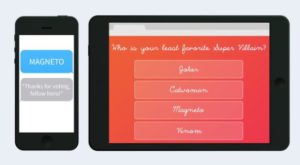
Get even more from Poll Everywhere – LaTeX, Surveys and more…

Polling and quizzing tools can be a great way to increase interactivity and engagement in classes, in particular in large lectures. 

Poll Everywhere is a useful tool which takes advantage of the mobile devices that students already use, affords students anonymity and encourages interaction between peers.

To learn more about the benefits of in class voting systems, read our post from September 2015, Encouraging student engagement through interactive lectures. Read more ›

Tagged with: , , ,
Posted in Learning Design, Polling tools, Technology Enhanced Learning

Constructively aligning criterion feedback using Turnitin

Reinforcing feedback. flickr photo by Jurgen Appelo shared under a Creative Commons (BY) license

Implementing processes to support the electronic management of assessment has been a priority for many universities and colleges in recent years, with many making use of Turnitin as a means of checking the originality of submitted work and providing feedback to students.  

The University of Sussex have been using Turnitin in this manner since the introduction of e-submission and e-feedback at the start of the 2014-15 academic year.

The following article will look at ideas and best practice for using Turnitin’s GradeMark software (soon to be renamed Feedback Studio) to constructively align marks and feedback to a module’s intended learning outcomes.  Read more ›

Tagged with: , ,
Posted in Marking and assessment, Technology Enhanced Learning

Get connected – engaging with online communities

The connected learner

The Networked Teacher, flickr photo by courosa shared under a Creative Commons (BY-NC-SA) license

‘Connectedness’ is the very essence of the social web.  Digital technologies have an important role in mediating connections but it is important to recognise that it is the connections that these tools facilitate that are important and not the tools themselves.

This notion was at the heart of Alec Couros’ seminal work on The Networked Teacher emerging from his PhD research and which has framed much of the discourse around connected education and the value of professional learning networks (PLNs).  Read more ›

Tagged with: ,
Posted in Digital scholarship, Technology Enhanced Learning

Conference Tweeting and Storify

Twitter is a great companion for academic conferences – before, during and after the event, the micro-blogging platform can expand and deepen the experience.

Building a conference community with a hashtag # 

Conference organisers will usually identify a suitable hashtag and start tweeting messages in advance of the big day. Twitter can be used to publicise the call for papers, the programme and registration. In the process it can begin to build a community around the conference. If you are organising an event, these Tips on Using Twitter for Conferences and Events by Sue Beckingham (@suebecks) include advice on selecting and using a conference hashtag.

Live-Tweeting

On the day there are likely to be some people ‘live-tweeting’, that is, reporting on the conference as it happens by tweeting. There is an etiquette around conference tweeting:

  1. Ask permission – unless organisers or presenters have explicitly said it is okay to tweet about what is being presented.
  2. Always attribute quotes – preferably using the speaker’s Twitter name (handle).
  3. Always include the conference hashtag.
  4. Remember tweets are completely public – so be polite and professional.

For more on how to tweet at conferences see:

Before you start tweeting at a conference warn your Twitter followers. For example:

Using Twitter and Storify in conferences.

Building the conversation

For those attending an event, Twitter provides an additional space for interaction and networking. Delegates can compare notes about parallel sessions, continue discussions and develop the conversation by linking to related resources.

Using Twitter and Storify in conferences.

If you cannot be at the event, following a conference hashtag is a great way of participating remotely. It is also good to bring other voices into conference conversations (see ‘Being there – or not?’). As this visualization of the #openbadgesHE hashtag shows, there can be varying degrees of interaction. This conference had 150 delegates attending, but the visualisation shows nearly 3 times that many nodes – each representing a use of the hashtag.

Using Twitter and Storify in conferences.

Click on the image to view

If you are speaking at a conference, you might want to consider sharing your slides on Twitter at the start of your session (services such as Hootsuite and Buffer will let you schedule tweets in advance).   

Tweeting as note-making

Live tweeting from a conference can be an engrossing activity and you may be wondering how to find time to tweet whilst listening and making notes. I use Twitter as my note-making system. Key messages I want to take away, I tweet. If others make good points or ask interesting questions I want to think about later I ‘like’ or retweet them. At the end of the event I have a collection of tweets that sums up the event for me.

Using Twitter and Storify in conferences.

To collect my Twitter notes and present them in a useful format I use Storify.

Storify

Storify is a free service that lets you create stories from social media posts (a paid version for teams includes the option to make stories private). It is most commonly used to collect everyone’s social media interactions around an event, but you can also use it to create your own story of a conference.

Once you sign up with an email address and choose a username and password you can start to create a new story. The first time you create a story from tweets you will need to connect your Twitter account, but this only takes a couple of clicks. You can also use Storify to gather content from other social media. Watch this video clip to find out more (1.22). 

Using Twitter and Storify in conferences.

Select the Twitter icon and enter your search term.

Storify will then find the tweets using that hashtag for about the last 10 days. You can select just the ones you want or choose to ‘add them all’. You can reorder to show the oldest or newest first, shuffle or delete individual tweets and add some text. Once you have given your story a title you are ready to publish. Storify will add the first image from the tweets you have included as a header image.

Once your story is published it will be public and anyone can find it by searching. You can share your story on social media and/or export it in a number of formats, most usefully as a pdf. If you want, you can notify the people you have quoted in your story.

Here is one I made earlier – it is my Twitter notes from the #openbadgesHE conference mentioned above.

Using Twitter and Storify in conferences.

https://storify.com/AnneHole/my-openbadgeshe-notes

Storify can also be used as another tool for learning through finding, choosing, sorting and sharing.

If you would like to discuss ways that you can use Twitter and/or Storify in your teaching and learning at Sussex please contact your school learning technologist or tel@sussex.ac.uk.


Tagged with: , ,
Posted in Social media, Technology Enhanced Learning

About our blog

We are the Educational Enhancement team at the University of Sussex. We publish posts each fortnight about the use of technology to support teaching and learning. Read more about us.

Subscribe to the Blog

Enter your email address to receive notifications of new posts by email.

Archive